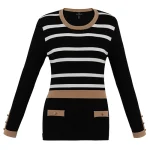
In today’s fashion ecommerce landscape, product photography plays a bigger role than ever before. Customers can’t touch or try on clothes when shopping online, so the images must do all the work of showing fit, fabric, and quality. That’s where ghost mannequin photography—also called the invisible mannequin effect or hollow man photography—has become a game changer.
This advanced technique creates 3D, lifelike images where garments appear as if they’re worn by invisible models. Unlike flat lays that look lifeless, or expensive model photoshoots, ghost mannequin photography delivers professional, clean, and conversion-driven visuals that highlight garments in their true form.
In this guide, we’ll explore everything you need to know about ghost mannequin photography—from equipment and studio setup, to editing workflows, quality control, costs, and creative applications. Whether you’re a fashion retailer, photographer, or ecommerce entrepreneur, this comprehensive resource will help you master the technique and transform your online store.
What is Ghost Mannequin Photography?
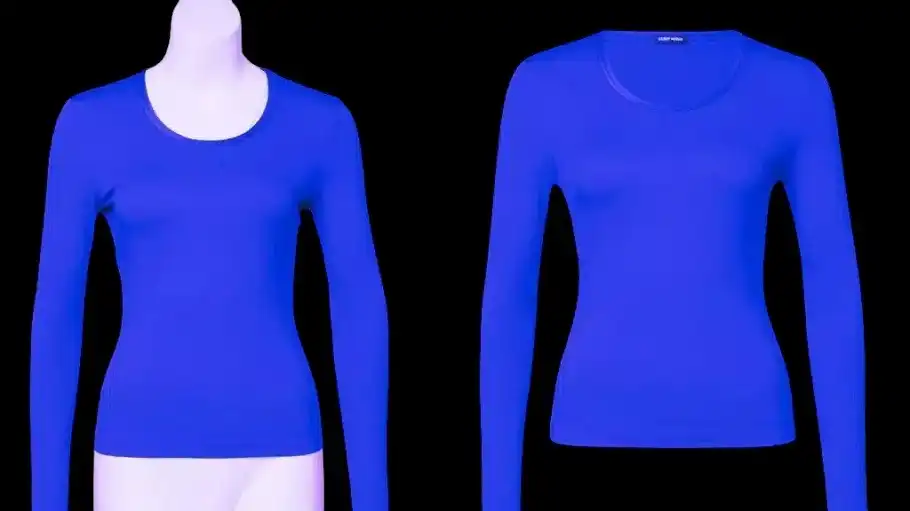
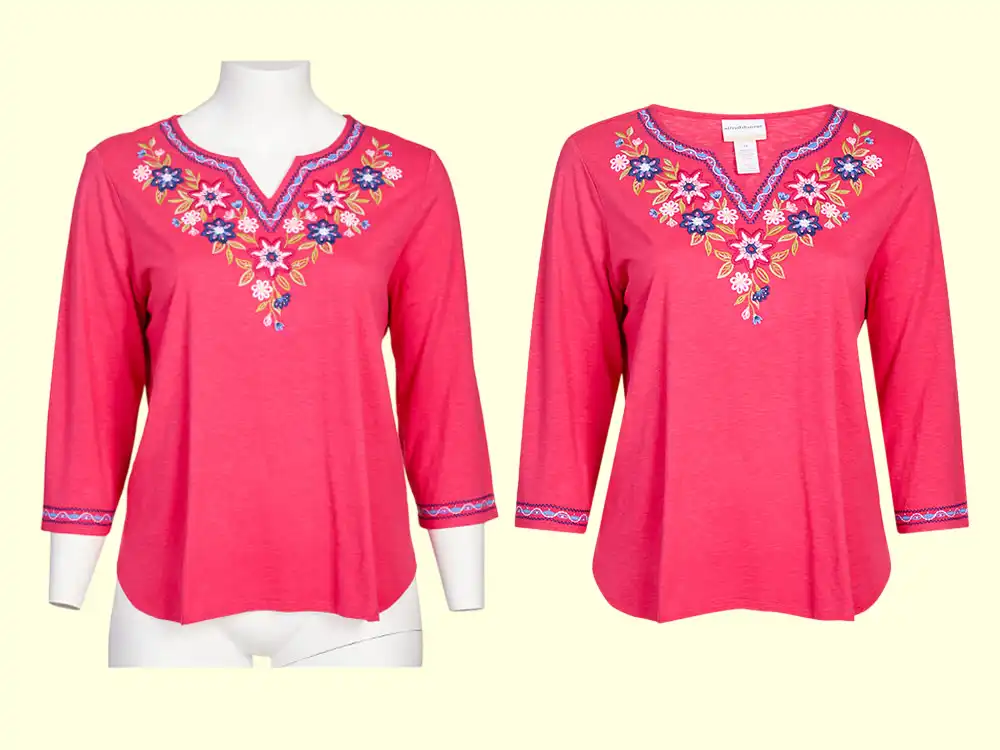
Ghost mannequin photography is a product imaging method where garments are photographed on mannequins and later edited to remove the mannequin digitally. The end result is a floating garment that shows shape, drape, and fit with no distractions.
Unlike flat lay photography, which often flattens clothing and hides how it would look on a body, the ghost mannequin technique provides a 3D representation. Unlike live model shoots, it’s cost-effective, consistent, and completely focused on the product.
This makes it especially effective for garments where shape and structure matter most
- Shirts and tops
- Jackets and blazers
- Dresses and skirts
- Suits and coats
For customers, ghost mannequin images create confidence. They can visualize how a garment will look when worn, which helps them choose the right product, reduces return rates, and improves the overall shopping experience
Why Ghost Mannequin Photography Matters in Ecommerce
Online fashion is a highly competitive space. Brands that stand out are those that combine convenience with compelling product visuals. High-quality ghost mannequin photos provide multiple business benefits:
1. Better Conversions: Shoppers buy when they clearly understand how a garment fits and flows.
2. Reduced Returns: By showing accurate draping and sizing, ghost images minimize sizing surprises.
3. Professional Branding: Clean, consistent images strengthen your visual identity.
4. Lower Costs: Compared to live models, ghost mannequin photography is far more affordable.
5. Scalability: Perfect for large catalogs—brands can shoot thousands of products with consistent results
In short, ghost mannequin photography isn’t just a technique—it’s a strategy for building trust and driving ecommerce growth.
Essential Equipment for Ghost Mannequin Photography
To achieve professional results, you’ll need a specific set of equipment designed for both photography and post-production efficiency. Think of this as building your toolkit:
1. Camera
A good camera ensures sharp, high-resolution images that hold up across websites, marketplaces, and social platforms. Choose a DSLR or mirrorless camera with manual controls:
– Canon 6D Mark II – Great all-rounder for fashion ecommerce.
– Sony Alpha A7R III – Mirrorless option with excellent resolution.
– Nikon D850 – Known for its incredible detail and dynamic range.
– Canon EOS 7D Mark II – A solid budget-friendly alternative.
2. Lenses
Lens choice is crucial for distortion-free, natural images. A focal length between 50mm and 85mm is ideal for apparel photography
3. Lighting
Lighting determines how fabric textures and colors appear. Softbox lights are best, positioned at 45-degree angles to the mannequin for even, shadow-free results
4. Mannequins
A modular mannequin is essential. Choose mannequins with detachable arms, necks, and chests so you can capture inner details (like collars and labels) easily. White or neutral tones work best for editing.
5. Supporting Tools
Don’t forget:
– A sturdy tripod (for consistent shots)
– Steamers or irons (to prep garments)
– Clips and pins (to adjust garment fit on mannequins
Setting Up the Studio Environment
Even with the right gear, your results depend on how well you control the studio environment. The goal is consistency—every garment should look equally polished.
Backgrounds
Use seamless paper backgrounds in white or light gray. This creates distraction-free product photos and makes mannequin removal easier in post-production
Lighting Setup
Use multiple light sources to avoid uneven shadows:
– Key lights on both sides of the mannequin.
– Fill lights or reflectors for balancing shadows.
– Overhead lights for consistency
Camera Positioning
Keep your camera on a tripod. Mark the floor where mannequins and tripods go so each session looks the same. This consistency saves hours in post-production and maintains a uniform brand look.
Shooting Workflow and Techniques
To maximize efficiency, build a repeatable workflow. Professional ghost mannequin photography usually follows this sequence:
Step 1: Garment Preparation
Wrinkled or poorly styled clothes can ruin shots. Always:
– Steam or iron garments.
– Use clips and padding to create proper drape.
– Ensure collars, cuffs, and hems are aligned.
Step 2: Camera Settings
Use manual mode for full control:
– ISO: 100–200 (for low noise).
– Aperture: f/8–f/11 (for sharp focus across garment).
– Shutter speed: Adjust to lighting.
Step 3: Capture Multiple Angles
Don’t stop at just front and back shots. Include:
– Side and three-quarter views.
– Close-ups of stitching, buttons, or unique details.
– Interior neckline shots for post-production composites.
Step 4: Maintain Consistency
Follow the same process across all garments. This makes your catalog look cohesive, professional, and reliable
Post-Production: Creating the Ghost Effect
This is where the mannequin disappears, and the garment takes center stage. The editing process usually involves:
1. Mannequin Removal – Using Photoshop’s Pen Tool or masking to carefully erase mannequins.
2. Compositing – Blending interior shots (like collars and labels) with exterior shots for a realistic 3D effect.
3. Refining – Cleaning edges, adding shadows, balancing colors, and ensuring natural lighting
The final image shows a clean, floating garment that looks professional and trustworthy
Maintaining Quality and Consistency
For ecommerce, consistency is just as important as quality. A professional workflow should include:
– Color Accuracy: Use color charts and calibrated monitors to maintain true fabric shades.
– Workflow Guides: Document camera settings, lighting setups, and editing steps for repeatability.
– Quality Checks: Always review before uploading to catch mistakes AI might miss
This ensures your brand looks professional across every channel
Cost Analysis: Outsourcing vs In-House
Ghost mannequin photography can be done in-house or outsourced. The decision depends on your scale, budget, and priorities
Outsourcing
– $0.50–$2 per image for standard edits.
– $8–$15 per image for complex garments.
– Great for small businesses or bulk editing.
In-House
– Requires upfront investments in cameras, lighting, mannequins, and editing software.
– Offers long-term savings and full creative control.
– Best for large ecommerce brands with high-volume product lines.
While costs vary, ghost mannequin photography usually pays for itself by boosting conversion rates (20–40%) and lowering return rates
Advanced Applications and Creative Uses
Ghost mannequin photography isn’t limited to basic product shots. It can also support creative and branded campaigns.
– Seasonal Adaptations: Heavier lighting for winter coats, softer tones for summer dresses.
– Branded Backgrounds: Subtle textures or lifestyle settings that enhance brand storytelling.
– AI Integration: Automating editing workflows with machine learning tools
These adaptations help you stand out in crowded marketplaces.
Common Mistakes to Avoid
Even with good equipment, mistakes can compromise results. Avoid these pitfalls:
– Wrinkled or poorly styled clothing.
– Uneven lighting causing shadows or hotspots.
– Incorrect mannequin removal leaving jagged edges.
– Inconsistent sizing or proportions across catalog shots.
– Over-editing that makes garments look unnatural.
By steering clear of these issues, your ghost mannequin images will look polished and professional.
Step-by-Step Example Workflow
Here’s a simplified walkthrough of how a ghost mannequin shoot might look:
1. Prepare garment (steam, clip, style).
2. Mount garment on mannequin.
3. Photograph front, back, sides, and interiors.
4. Import into Photoshop.
5. Remove mannequin using masks.
6. Add neckline interiors.
7. Adjust colors and shadows.
8. Export for web or print.
This clear process keeps teams efficient and consistent.
FAQs About Ghost Mannequin Photography
Is ghost mannequin photography better than flat lay photography?
Yes—flat lays can’t show how garments drape on the body, while ghost mannequin creates a realistic 3D effect.
Do I need expensive equipment?
Not necessarily. A mid-range DSLR, softbox lights, and a modular mannequin are enough to start.
Can I use AI tools for editing?
Yes, AI can speed up basic edits, but manual retouching ensures higher quality.
How much does outsourcing cost?
Most services charge $0.50–$2 per image, with premium edits costing more.
Which garments benefit most from ghost mannequin photos?
Structured garments like shirts, blazers, dresses, and jackets work best, though almost any apparel can benefit.
Conclusion
Ghost mannequin photography is more than just a technique—it’s a strategic advantage for fashion ecommerce. It delivers professional, consistent, and cost-effective product images that increase customer trust, reduce returns, and boost conversions.
By investing in the right equipment, setting up a proper studio, and mastering editing workflows, you can produce stunning product visuals that set your brand apart. For businesses looking to scale, ghost mannequin photography offers the perfect balance between cost, quality, and efficiency.
As ecommerce continues to grow, one thing is clear: ghost mannequin photography will remain an essential tool for fashion retailers who want to win customer attention—and turn browsers into confident buyers.