Jewelry photography is a delicate dance between light, lens, and precision—where a single misplaced reflection or soft edge can turn a sparkling heirloom into a dull snapshot. If you’re a jeweler prepping for Etsy listings, an eCommerce pro scaling your catalog, or a hobbyist capturing custom pieces, nailing the right camera settings is your secret weapon. In this comprehensive guide, we’ll dive deep into the optimal configurations for macro jewelry photography, drawing from pro techniques and the latest advancements like in-camera AI stacking. Whether you’re battling shallow depth of field on diamond rings or taming glare on gold chains, these settings prioritize crystal-clear details, true colors, and that professional pop that boosts sales by up to 30%.
We’ll cover everything from core exposure triad (aperture, ISO, shutter speed) to advanced workflows like focus stacking, essential gear, and pitfalls to avoid. By the end, you’ll have a repeatable formula to make your jewelry shots irresistible. Let’s get into the settings that pros swear by.
The Unique Challenges of Jewelry Photography: Why Settings Matter
Before tweaking dials, understand the battlefield. Jewelry demands extreme close-ups (1:1 macro ratios) where even millimeters matter. Challenges include:
- Shallow Depth of Field (DoF): At close distances, only a sliver stays sharp—critical for capturing prong settings or gem facets.
- Reflections and Glare: Shiny metals and stones bounce light unpredictably, washing out colors or creating hotspots.
- Color Fidelity: Gems like sapphires or emeralds shift hues under wrong white balance, misleading buyers.
- Noise in Details: Tiny engravings amplify any grain from high ISO.
Manual mode unlocks control here, overriding auto’s guesswork. With a tripod stabilizing your setup, you can prioritize sharpness over speed. Pro tip: Always shoot tethered to a computer for instant histogram checks—essential for exposure accuracy on reflective surfaces.
Core Camera Settings: The Foundation for Flawless Jewelry Shots
For most jewelry work, start in manual mode with these baseline settings. They’re optimized for studio conditions (soft, diffused light) but adaptable for natural setups. Test on a gray card for calibration.
Aperture (f-stop): Prioritize Depth Without Diffraction
The aperture controls light intake and DoF—your first line of defense against blurry edges.
- Recommended: f/11 to f/16. This sweet spot delivers ample DoF to keep an entire ring or pendant tack-sharp from front to back, ideal for macro jewelry photography. At f/8, you get faster shots with good sharpness; push to f/22 only if stacking (more on that later), as diffraction softens fine details.
- Why It Works: Higher f-stops (smaller openings) increase the zone of focus, crucial for intricate pieces like filigree earrings. In this time, sensors like those in the Sony A7R V handle f/16 with minimal softness.
- Adjustment Tip: For lifestyle shots (jewelry on models), drop to f/5.6 for creamy bokeh that isolates the piece.
| Jewelry Type | Ideal f-stop | DoF Benefit |
|---|---|---|
| Rings/Delicate Chains | f/11–f/13 | Sharp prongs and links |
| Necklaces/Pendants | f/13–f/16 | Full chain in focus |
| Bracelets (Curved) | f/8–f/11 | Balanced for curves |
ISO: Low and Steady for Pristine Detail
ISO measures sensor sensitivity—keep it low to banish noise that muddies engravings or gem inclusions.
- Recommended: ISO 100 or 200. Base ISO 100 yields the cleanest files, perfect under controlled studio lights. Bump to 200 if shadows creep in, but avoid 400+ unless desperate—modern full-frame sensors (e.g., Canon EOS R50) tolerate it better in today, but noise still creeps into shadows.
- Why It Works: Jewelry’s fine textures demand zero grain; low ISO preserves dynamic range for post-edits like boosting sparkle.
- Pro Hack: Enable long exposure noise reduction in-camera for ultra-clean results on slower shutters.
Shutter Speed: Stability Over Speed
With a tripod, shutter speed is your exposure balancer, not a motion fighter.
- Recommended: 1/60s to 1/125s base; go slower (1/15s–1s) for low light if stabilized. Use bulb mode for extreme control in stacking sequences.
- Why It Works: Tripod eliminates shake, letting you prioritize aperture/ISO. In continuous lighting setups, match sync speed (1/200s) for strobes to freeze any micro-vibrations.
- Tip: Remote shutter release or self-timer prevents jitters—vital for handheld tests.
White Balance & Focus: Precision for Colors and Clarity
- White Balance: Manual at 5000K–6500K (daylight/softbox). Use a gray card for custom preset—auto WB often warms golds or cools silvers.
- Focus: Switch to manual focus (MF) with live view at 10x zoom. Autofocus hunts on shiny surfaces; MF lets you nail the gem’s center.
- Bonus: Enable peaking highlights for instant sharpness confirmation.
Shoot in RAW—it’s non-negotiable. RAW files retain 14+ stops of data for recovering highlights on diamonds without posterization.
Advanced Techniques: Elevate Your Settings with Pro Methods
Basic settings get you started, but mastery comes from techniques that push boundaries.
Focus Stacking: Achieving Impossible Sharpness in Macro Jewelry Photography
Shallow DoF is macro’s nemesis—enter focus stacking, blending 5–50 images for edge-to-edge clarity.
- How-To:
- Set aperture to f/8–f/11 (wider for less diffraction).
- ISO 100, shutter 1/125s+.
- Use focus bracketing (in-camera on Nikon Z6 II or Olympus OM-1) or manual rail: Shift focus in tiny increments (e.g., 50–100 steps for a ring).
- Stack in Photoshop (Auto-Blend Layers) or Helicon Focus—align, merge, and mask artifacts.
- Recent Update: AI tools like Adobe’s Neural Filters automate alignment, cutting processing time by 50%.
- When to Use: Essential for high-magnification shots (e.g., gem inclusions); skip for simpler flat lays.
Lighting Techniques: Pairing Settings with Reflection Control
Settings alone won’t tame glare—integrate lighting:
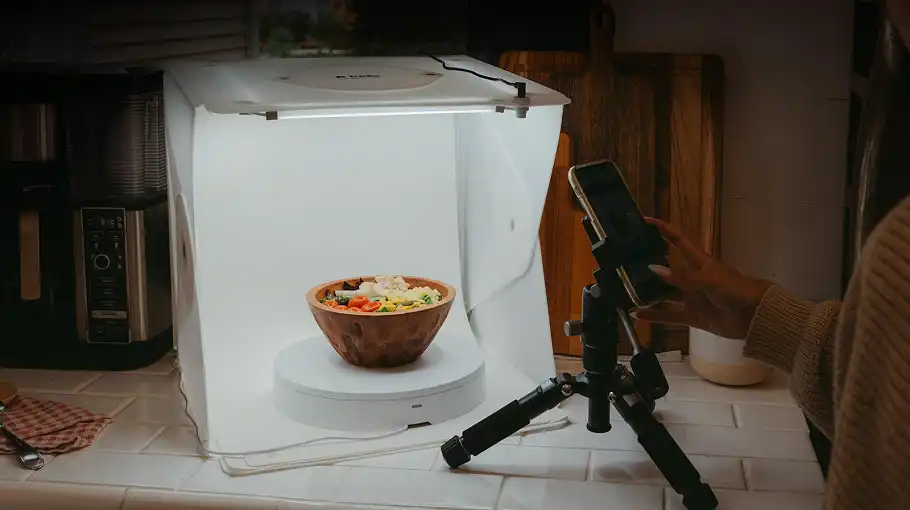
- Setup: 45-degree key light (LED panel at f/11) with diffusers; fill from below via light tent. Polarizing filter on lens cuts 90% of reflections.
- Advanced: Cross-polarization for gems (polarizer on light + lens); continuous vs. flash for consistent WB.
- Tip: At ISO 100, expose for midtones—recover specular highlights in RAW.
Composition Angles & Propping for Dynamic Shots
- Angles: Frontal (0°) for symmetry; 45° for dimension; overhead for bracelets.
- Propping: Museum putty or invisible fishing line holds pieces aloft—shoot at f/16 to blur supports.
Gear Essentials: Settings-Optimized Recommendations
To make these settings shine:
- Cameras: Budget: Canon EOS R50 ($679, great low-ISO macro). Pro: Nikon Z6 III ($2,499, built-in stacking).
- Lenses: Sigma 105mm f/2.8 DG DN Macro ($699)—1:1 ratio, sharp wide open.
- Supports: Gitzo GT1545T tripod ($800); StackShot rail ($1,000) for automated bracketing.
- Lighting: Godox SL-60W LED ($129) + Neewer light tent ($30).
| Gear Tier | Camera/Lens Combo | Best For | Price Range |
|---|---|---|---|
| Beginner | Canon R50 + 100mm Macro | Entry macro | $1,000–$1,500 |
| Intermediate | Nikon Z6 II + 105mm | Stacking workflows | $2,000–$3,000 |
| Pro | Sony A7R V + 90mm Macro | High-res details | $4,000+ |
Step-by-Step Workflow: From Setup to Stacked Masterpiece
- Prep (10 mins): Clean jewelry with microfiber; set up tent on white seamless.
- Camera Config (5 mins): Manual mode, f/11, ISO 100, MF, RAW.
- Light & Compose (15 mins): Position key light, prop piece, meter exposure.
- Shoot Brackets (10–20 mins): 15–30 focus shifts; review histograms.
- Process (30 mins): Import to Lightroom (WB tweak), stack in Photoshop, export JPEG for web.
- Review: Tethered live view ensures no hot spots.
Total time per piece: Under an hour for pros.
Common Mistakes to Avoid & Insider Tips
- Mistake: High ISO for Speed—Causes noise; use tripod instead.
- Mistake: Auto WB on Gems—Falsifies colors; custom always.
- Tip: Calibrate Yearly—Monitor for accurate edits; use X-Rite ColorChecker.
- Trendy Hack: Leverage in-camera AI (e.g., OM System OM-1) for auto-bracketing—frees up creative energy.
- FAQ:
- Best ISO for diamond rings? ISO 100—maximizes sparkle without noise.
- f/16 too soft? Stack to compensate.
Settings get you a clean capture; stones and metal still need a finishing pass. That is high-end jewellery retouching.
Conclusion
Mastering the best camera settings for jewelry photography boils down to f/11–f/16, ISO 100, manual focus, and RAW—turbocharged by focus stacking and diffused lighting. These aren’t rigid rules but a flexible framework to showcase your pieces’ true allure, driving clicks and sales in a crowded market.