ISO-certified studio · 80+ retouchers · 3M+ images +65 9050 7285 [email protected] Open 24 hours
Start a Free Trial
Built for Shopify merchants Shopify product photo editing

Product Photo Editing & Retouching for Shopify Stores

Professional product photo editing and retouching for Shopify stores, from $0.39 an image. On a marketplace you inherit the template; on Shopify you are the template, and an inconsistent grid reads as an amateur store. Pixel Retouching has run Shopify product editing since 2014, from ISO-certified studios in Singapore and Dhaka.

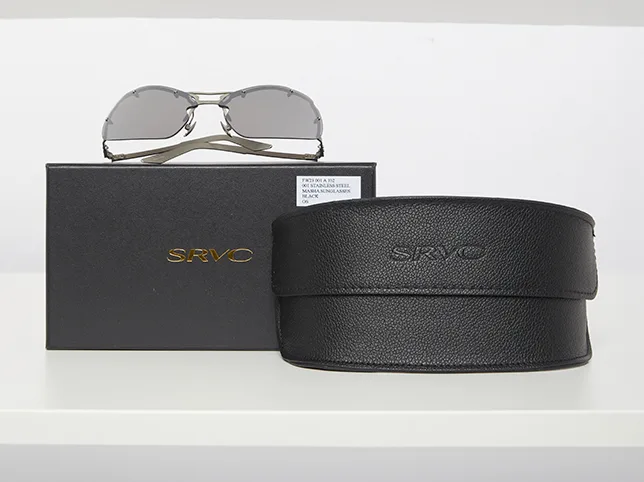
Sunglasses after retouching Sunglasses before retouching After editBefore

Hover to see before

Send three products and tell us your theme. You get them back at 2048px square, on your background.

$0.39 per image
24h standard turnaround
3M+ images edited

Trusted by the studios and brands that supply Shopify stores

Two hundred brands worldwide run their catalogue work through the same ISO-certified production floor.


ZEELUM
SQUARESHOT
soona
Pro Product Photo
OMS Photo
Prop Photo Studio
Northlane
VANTRA
Lumeo
Kindred & Co.
Atelier Nine
HALCYON
ZEELUM
SQUARESHOT
soona
Pro Product Photo
OMS Photo
Prop Photo Studio
Northlane
VANTRA
Lumeo
Kindred & Co.
Atelier Nine
HALCYON
3M+Images processed
80+In-house retouchers
8,000+Images a day
200+Brands worldwide
The real constraint

What Actually Goes Wrong on a Shopify Catalogue

It is almost never one bad photograph. It is four hundred photographs that no longer agree with each other.

Nothing enforces a standard

Amazon rejects a listing that breaks its rules. Shopify does not, so drift is invisible until the collection page looks like six different shops stacked together. Somebody has to hold the line, and that is the job.

Six shoots, six white points

Product added over a year, shot on different days under different light, sits on six slightly different whites. Individually every image looks fine. Side by side in a grid the difference is the first thing a shopper notices.

Variants that do not change the picture

A colour swatch that loads the same photograph tells the shopper nothing and costs you the sale. Every colourway needs its own image, and reshooting each one is rarely worth the money.

Product sitting at different scales

One item filling the frame and the next floating small in the middle makes a grid feel unsteady. Consistent scale and centring is invisible when it is right and obvious when it is not.

Delivery spec

What We Deliver for Shopify

The standard output for a Shopify order. Tell us your theme and we match its aspect ratio instead of assuming square.

Recommended size
2048 × 2048 px, the size Shopify recommends for zoom
Aspect ratio
1:1 square by default, or your theme’s ratio if it differs
Background
Pure white, or one consistent brand background across the catalogue
File format
JPG for photography, PNG where transparency is needed, WebP on request
File naming
Your own convention — SKU, handle or variant, matched to your CSV
Turnaround
24 hours standard, same day for small batches before the cut-off

Shopify accepts up to 4472 × 4472 px and 20 MB per image. We deliver at 2048px because it satisfies zoom without slowing the storefront down.

What we edit

What We Edit for a Shopify Store

Five jobs cover most Shopify catalogues. Each one links to the service page that explains how the technique is actually performed.
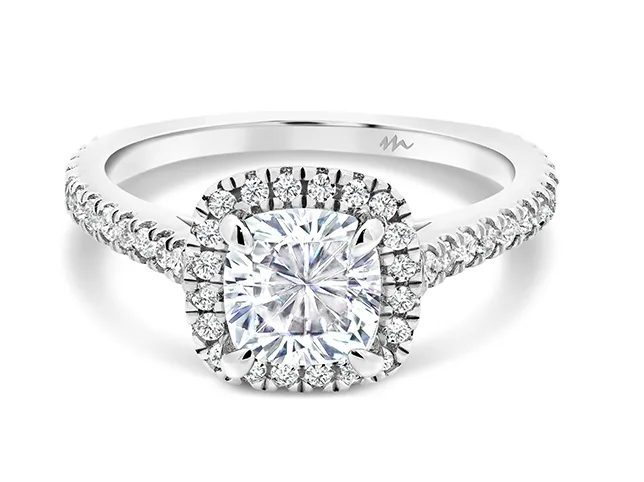
Cushion-cut diamond ring after being moved from a tinted backdrop onto catalogue white
Cushion-cut diamond ring before being moved from a tinted backdrop onto catalogue white
Before After

One White, Across the Whole Catalogue

The product is cut out by hand and placed on a single, defined white rather than whatever the backdrop happened to be that day. Once the white is fixed, a collection page stops looking like it was assembled from separate shoots, because it no longer was.

  • Hand-drawn paths, never automatic selection
  • One defined white point across every product
  • Edge fringe decontaminated of the old background
  • Layered file kept so the background can change later

How this is done: eCommerce Photo Editing

Try it on 3 images

Every Colourway From One Photograph

Shoot the product once and we build the rest of the range from it. The new colour is rebuilt through the original texture and shadow, so denim still reads as denim rather than as a flat fill, and your variant swatches finally change the picture the shopper is looking at.

  • Colour rebuilt through texture, not painted over it
  • Matched to Pantone, hex or a physical swatch
  • Whole ranges kept consistent with each other
  • Far cheaper than reshooting each variant

How this is done: Colour Change

Try it on 3 images
Trucker cap after three colourways were built from one photograph
Trucker cap before three colourways were built from one photograph
Before After
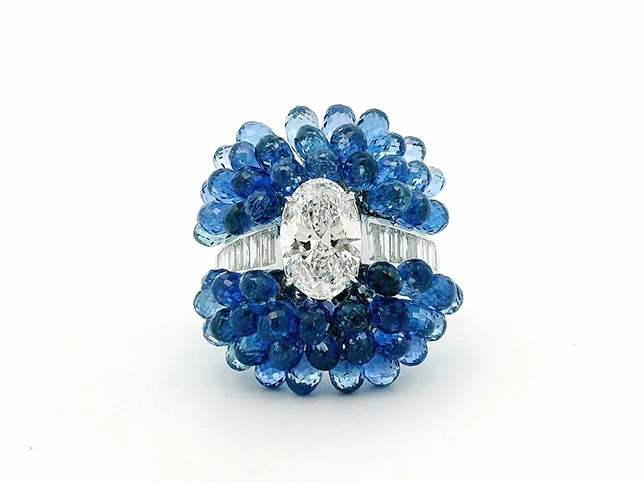
Sapphire and diamond cluster ring after shadow work that sits it on the page
Sapphire and diamond cluster ring before shadow work that sits it on the page
Before After

Stones and Small Detail at Grid Size

A cluster piece is a dozen stones that each photograph slightly differently, and on a collection page it is reproduced at about the size of a postage stamp. Worked as one object the cluster becomes a blue blob; worked stone by stone it still reads as set stones when a shopper scrolls past it, which is the only size that decides whether they stop.

  • Each stone corrected, not the cluster as one
  • Setting metal evened around them
  • Judged at thumbnail size, not at full size
  • Colour held across the whole collection

How this is done: eCommerce Photo Editing

Try it on 3 images

Long and Awkwardly Shaped Products

A scarf, a belt or anything far taller than it is wide is the hardest shape to put in a square tile: fit the whole thing in and the product is a thin line down the middle, crop to fill and half of it is gone. The frame is built around the silhouette rather than the bounding box, so the product carries the same visual weight as the square items beside it.

  • Cropped to the silhouette, not the bounding box
  • Same visual weight as its neighbours
  • Full length kept in the zoom image
  • Consistent margin across the collection

How this is done: Cropping & Resizing

Try it on 3 images
Black tasselled accessory after being straightened, centred and cropped
Black tasselled accessory before being straightened, centred and cropped
Before After
Denim jacket after ghost mannequin editing to the catalogue standard
Denim jacket before ghost mannequin editing to the catalogue standard
Before After

A Whole Catalogue Brought Into Line

The usual Shopify job is not three images, it is the back catalogue. A written style guide is set from your best existing images, then applied across everything else by a named retoucher, with a second editor checking the batch before it ships.

  • Written style guide per account
  • Same retoucher across the catalogue
  • Second-editor check on every file
  • Capacity for 8,000 images a day

How this is done: eCommerce Photo Editing

Try it on 3 images
The services behind it

The Services a Shopify Store Bundles

A Shopify order is normally these four together rather than any one of them alone. Each page carries its own rate and before-and-after.

How it runs

How a Shopify Catalogue Runs

The same four stages whether it is three products or a four-thousand-SKU migration.

  1. 01

    Send the files and your storefront details

    Upload the images and tell us the theme, the ratio it expects and how your files are named. That one message removes most of the revision rounds before they happen.

  2. 02

    We set the style guide from your best images

    Rather than imposing a look, we pick the images you already like and write the white point, shadow weight and scale down as a spec. Everything after that is measured against it.

  3. 03

    Hand-edited in Photoshop, then checked

    A named retoucher works the batch and a second editor reviews every file. No automated background removal, which is what produces the halos and chewed edges that show at zoom.

  4. 04

    Delivered named and sized for your import

    Files come back at 2048px square, named to your convention so they drop straight into a product CSV. Revisions are unlimited until it is right.

Common questions

Frequently Asked Questions

How is this different from your eCommerce photo editing service?

The service page explains the listing edit itself — the technique, what it includes and what it costs. This page is about the problem specific to running your own storefront: no platform enforces consistency for you, so a catalogue built over months drifts. Most Shopify orders end up being that consistency job rather than any single technique, and the service page is linked from every row above if you want the technique detail.

What image size should Shopify product photos be?

2048 × 2048 pixels is the practical answer. Shopify accepts up to 4472 × 4472 px and 20 MB, but 2048 already satisfies the zoom function and keeps the storefront fast, which matters more for conversion than extra resolution nobody sees. If your theme uses a non-square ratio we deliver to that instead.

Can you match my existing product photos rather than change the look?

Yes, and that is usually the right call. We ask which of your current images you consider correct, write the white point, shadow weight and scale down as a written spec, and edit everything else to match it. The goal is that new work is indistinguishable from your best existing work, not that it looks like ours.

Can you create colour variants without a reshoot?

Yes. One photograph produces the whole range: the new colour is rebuilt through the original texture and shading so the material still reads correctly, and we can match to a Pantone reference, a hex value or a physical swatch you post to us. It is normally a fraction of the cost of reshooting each colourway.

Do you name files so they import into Shopify cleanly?

Yes. Tell us your convention — SKU, product handle, variant suffix, position number — and files come back named to it so they map straight onto a product CSV. For recurring catalogue work we can also connect to your FTP so hand-off and delivery happen without anyone attaching anything.

How many products can you turn round at once?

Capacity is 8,000 images a day across eighty in-house retouchers, so a full catalogue migration is routine rather than exceptional. There is no minimum either — a single product is a valid order. Standard turnaround is 24 hours, longer only on very large batches, and we confirm the date before starting.

Do you use AI background removal?

No. Every image is cut by hand in Photoshop. Automatic removal is exactly what produces the halo around hair, the chewed edge on a curve and the invented detail that appears when a shopper zooms — the failures that make a store look cheap at the moment someone was about to buy.

What does it cost to try?

Nothing. Send three products through the free trial with a note about your theme and we edit them to your brief. No card, no account and no sales call. You keep the files whether or not you order anything else.

Get started

Send Three Products From Your Store

Pick the three that currently look least like each other. That is the fastest way to see whether we can hold your catalogue to one standard.

Scroll to Top