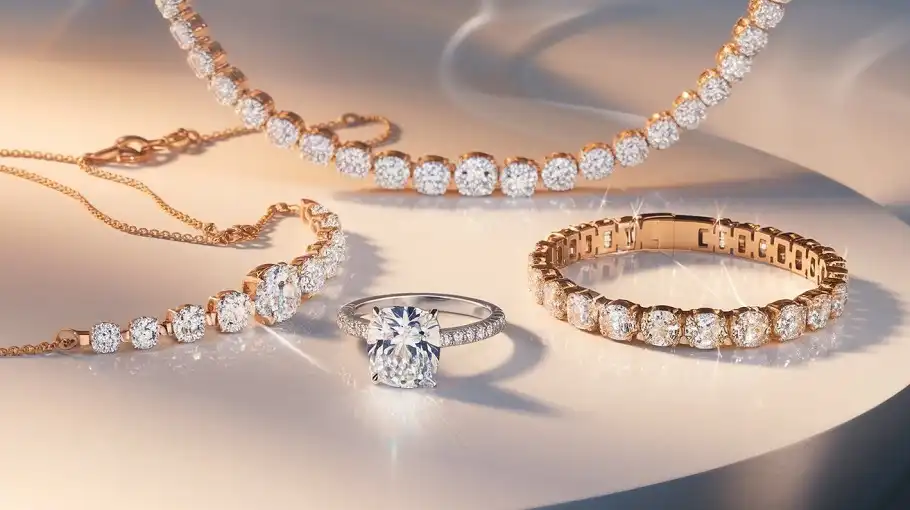
If you’ve ever tried to photograph jewelry, you know the struggle: every reflection shows, every speck of dust becomes visible, scratches you couldn’t see with the naked eye suddenly appear in macro shots, and that brilliant gemstone looks dull and lifeless in the camera. You’re not alone. Jewelry photo retouching has always been one of the most demanding tasks in product photography, requiring either expensive professional services or countless hours learning complex Photoshop techniques.
This guide cuts through the hype to show you exactly where AI works for jewelry retouching, where it still fails, and the precise workflow that professional photographers and e-commerce sellers are using to save hours while maintaining quality. Whether you’re shooting for Etsy, managing product photography for a luxury brand, or running a jewelry retouching service, you’ll learn the practical truth about AI jewelry photo editing and how to integrate it into your workflow without sacrificing the perfection your products deserve.
We’ve tested every major AI tool against traditional Photoshop methods and professional retouchers to bring you real-world results, not marketing promises.
Why Jewelry Is the Hardest Product to Retouch
Jewelry photography presents unique challenges that make it notoriously difficult to edit, even for experienced retouchers. Understanding these challenges is the first step to solving them effectively.
Reflections from metal surfaces are perhaps the biggest headache. Gold, silver, and platinum act like mirrors, capturing everything in the environment, including the camera, lighting equipment, the photographer, and even the room itself. These reflections aren’t simple to remove because they’re integral to how the metal appears three-dimensional and lustrous. Remove too much reflection, and the jewelry looks flat and lifeless. Leave too many unwanted reflections and the product looks unprofessional.
Micro dust and scratches visible in macro shots become another major issue. The high-resolution macro photography required to showcase jewelry detail means that every tiny particle, fingerprint, or microscopic scratch becomes glaringly visible. What looks clean to the naked eye transforms into a minefield of imperfections when captured at high magnification. A single jewelry piece might have dozens of dust particles and surface marks that need individual attention.
Uneven shine on gold and silver creates inconsistent lighting across the piece. Some areas catch the light beautifully, while others fall into shadow or develop hot spots that blow out detail. Achieving uniform, attractive shine across an entire piece while maintaining depth and dimension requires sophisticated techniques that balance exposure across multiple areas simultaneously.
Gemstone brilliance loss inthe camera is perhaps the most frustrating challenge. The human eye sees gemstones as vibrant, sparkling, and full of life, but cameras often capture them as dark, dull, or lifeless. The dynamic range and color depth that make stones beautiful in person don’t translate directly to digital sensors. Restoring that fire and brilliance requires careful enhancement of clarity, saturation, and highlights without creating an artificial or oversaturated appearance.
Why basic photo editors fail here becomes obvious when you consider these combined challenges. Simple exposure adjustments can’t target specific areas without affecting others. Automated filters can’t distinguish between wanted reflections that add dimension and unwanted reflections that distract. Brush-based tools require pixel-perfect precision across hundreds of tiny imperfections. This is why jewelry retouching has traditionally required either advanced Photoshop skills or hiring professional retouchers who specialize in this niche.
Traditional Jewelry Retouching in Photoshop (Time, Skill, Cost)
Before AI tools emerged, professional jewelry retouching meant mastering Photoshop techniques that took years to learn and significant time to execute on each image.
Frequency separation is the foundation technique for high-end jewelry editing. This advanced method splits an image into two layers: one containing color and tone information, the other containing texture and detail. By separating these elements, retouchers can smooth out uneven tones in metal surfaces while preserving the fine texture that makes the piece look real. However, frequency separation is technically complex, requires precise layer math, and takes considerable practice to master. Even experienced retouchers spend several minutes setting up and applying frequency separation to a single piece.
Dodge and burn for metal shine involves painstakingly painting light and shadow onto the metal surfaces to create even, beautiful shine. Professional retouchers create multiple curve adjustment layers, paint on layer masks with low-opacity brushes, and gradually build up highlights and shadows to sculpt the perfect appearance. This might mean 50-100 individual brush strokes on a single ring, each carefully placed and blended. The technique creates stunning results but demands both artistic skill and meticulous attention to detail.
Manual scratch removal requires the healing brush, clone stamp, and patch tools used with surgical precision. Each scratch must be identified, selected, and carefully removed while preserving the underlying texture and tone of the metal. For a heavily handled vintage piece or a product shot of used jewelry, this process alone might involve 200-300 individual tool applications across the piece. Miss even one scratch and the entire image looks unfinished.
Masking reflections represents perhaps the most challenging Photoshop task in jewelry work. Unwanted reflections must be isolated using precise selections, then replaced with either cloned areas from elsewhere in the piece or digitally painted replacements that match the surrounding metal. Creating believable replacement areas requires understanding how light interacts with different metal finishes, how curves and facets catch light, and how to blend the fixes seamlessly into surrounding areas.
Time per image for professional Photoshop jewelry retouching typically ranges from 15 to 45 minutes per image, depending on the piece complexity, the number of gemstones, and the cleanliness of the original shot. A simple pendant on a clean background might take 15 minutes, while a complex multi-stone ring with numerous reflections and surface issues could easily require 45 minutes or an hour of work. For jewelry businesses shooting dozens or hundreds of products, this time investment becomes prohibitive.
Cost of professional retouching reflects both the time investment and specialized skill required. Professional jewelry retouching services, including companies like pixelretouching, typically charge between $5 to $25 per image depending on complexity, with luxury catalog work commanding premium rates of $30-50 or more per image. For a jewelry brand photographing a new collection of 100 pieces, professional retouching costs can range from $500 to $2,500 or more. While the quality justifies the investment for high-end brands, many small sellers and independent jewelers find these costs difficult to sustain.
What “Jewelry Retouching AI” Actually Means
The term “AI jewelry photo editing” gets thrown around liberally in marketing materials, often creating unrealistic expectations. Let’s clarify what AI tools actually do for jewelry photography.
AI dust and scratch removal uses machine learning algorithms trained on millions of images to identify and remove small imperfections. The AI analyzes patterns in the surrounding area and intelligently fills in the removed defect with texture and tone that match the context. Modern AI tools can identify and remove dozens of dust particles in seconds, a task that would take 15-20 minutes manually in Photoshop. However, the quality varies significantly based on the size and location of the defect.
AI background cleanup excels at removing distractions from backgrounds and creating clean, consistent product shots. AI-powered background removal tools can accurately trace complex jewelry outlines, including delicate chains and intricate filigree work, then either remove the background entirely or replace it with a solid color. This automation transforms what used to be 10 minutes of careful masking work into a 10-second automated process.
AI shine enhancement applies learned patterns about how metals should reflect light to boost and even out reflections across jewelry pieces. These algorithms can identify metal surfaces and selectively enhance their luminosity and contrast to create more appealing shine. The results are surprisingly effective for minor improvements, though they can’t replace sophisticated dodge and burn work for problem areas with poor original lighting.
AI clarity enhancement targets gemstones and metal detail to boost edge definition and micro-contrast without creating harsh, artificial sharpening. Modern AI clarity tools use sophisticated edge detection to identify where to apply enhancement, creating the appearance of sharper, more brilliant gemstones without the haloing and artifacts that plague traditional sharpening filters.
Not full magic – assistive workflow is the critical understanding that separates realistic expectations from disappointment. AI tools don’t magically transform terrible jewelry photos into perfect catalog images. Instead, they function as powerful assistants that handle the tedious, repetitive aspects of retouching, freeing up human time for the creative and judgment-based decisions that AI can’t yet make. The most effective approach combines AI automation for appropriate tasks with manual refinement for elements requiring artistic judgment or precision beyond current AI capabilities.
Where AI Works Extremely Well for Jewelry Photos
AI has achieved genuinely impressive results in several specific aspects of jewelry retouching. Understanding where to deploy these tools maximizes their value.
Dust and Micro-Scratches Removal
AI dust removal for jewelry photos represents one of the technology’s clearest success stories. Modern AI tools trained on vast datasets of jewelry images can identify dust particles, fingerprints, and minor scratches with remarkable accuracy, then remove them while preserving the underlying texture and tone.
The technology works by analyzing the pattern of the surrounding area and intelligently filling in the imperfection. Unlike content-aware fill in Photoshop, which sometimes creates blurry or repetitive patterns, the best AI tools understand the structure of metal surfaces and maintain realistic texture across the repair.
For typical jewelry product photography with 20-50 visible dust particles and minor surface marks, AI tools reduce what would be 20 minutes of manual healing brush work to about 30 seconds of automated processing. The time savings scale dramatically when processing large batches of product images.
However, AI scratch removal for metal works best on fine surface marks and light scratches. Deep gouges, significant dents, or scratches that interrupt edge details still require manual attention. The AI can clean up 80-90% of imperfections automatically, leaving only the most challenging issues for human retouching.
Cleaning Dirty Backgrounds
Background removal and cleanup represent another area where AI delivers production-ready results. Modern AI background tools can accurately detect and separate jewelry from backgrounds, even when dealing with complex shapes like chains, intricate settings, or pieces with numerous small gaps and openings.
The edge detection capabilities of current AI background removal tools have improved dramatically in recent years. These tools can distinguish between a diamond’s faceted edge and a white background, trace the delicate links of a chain without losing fine details, or preserve the intricate cutouts in filigree work that would be tedious to mask manually.
For jewelry sellers creating product images for e-commerce platforms, AI background cleanup can generate consistent white or transparent backgrounds across entire product catalogs in minutes rather than hours. The technology handles the bulk of the work, though fine jewelry pieces with extremely delicate elements may still benefit from manual edge refinement.
Enhancing Metal Shine (Gold/Silver/Platinum)
Jewelry shine enhancement through AI has advanced significantly, particularly for creating more even, appealing metal surfaces in product photography. AI tools can analyze metal surfaces, identify areas where reflections are weak or inconsistent, and selectively boost highlights and contrast to create more attractive shine.
These algorithms work particularly well on gold jewelry, where they can enhance the warm, lustrous quality that makes gold appealing. The AI identifies gold surfaces and applies enhancement that respects the metal’s characteristic color and reflectivity, creating richer, more vibrant gold tones without shifting toward orange or yellow casts.
For silver and platinum, AI enhancement tools boost the bright, mirror-like quality while managing the tendency for these metals to blow out highlights. The results create clean, professional-looking silver that maintains detail in both highlight and shadow areas.
The limitation remains that AI shine enhancement works as an improvement layer over existing lighting, not a replacement for it. Jewelry shot with poor lighting won’t transform into perfectly lit pieces through AI alone. However, well-lit jewelry with minor inconsistencies can achieve remarkably polished results through AI enhancement.
Improving Gemstone Clarity
AI gemstone clarity enhancement addresses one of the most frustrating gaps between how stones appear in person versus in photographs. Modern AI tools can identify gemstone areas and apply selective enhancement that boosts their apparent brilliance and life without creating artificial oversaturation.
The technology works by analyzing the facet structure of gemstones and selectively enhancing edge definition, micro-contrast within the stone, and the play of light across facets. This creates the impression of greater clarity and fire – the visual effect that makes gemstones attractive to the human eye.
For diamonds, AI clarity enhancement can restore the sparkle that gets lost in digital capture, making stones appear more brilliant and lively. For colored gemstones like sapphires, rubies, and emeralds, AI enhancement can deepen color saturation and improve the visibility of internal fire and color variation that gives stones character.
The key to effective AI gemstone enhancement lies in restraint. Over-processing creates artificial-looking stones with unnatural saturation or false sparkle. The best results come from AI tools with settings calibrated specifically for jewelry, or from using general AI tools with conservative settings and manual fine-tuning.
Where AI Still Fails (Trust Builder Section)
Despite impressive advances, AI jewelry retouching has clear limitations. Understanding these boundaries prevents disappointment and helps you plan when manual intervention is necessary.
Complex reflections remain largely beyond current AI capabilities. When jewelry reflects specific identifiable objects – lighting equipment, the photographer, window frames, or other environmental elements – AI tools struggle to replace these intelligently. The algorithms can identify that a reflection exists, but lack the contextual understanding to determine what reflection should replace it. Removing a reflection of a camera from a highly polished ring surface requires understanding the three-dimensional shape of the ring, how light should realistically interact with that shape, and what an appropriate replacement reflection would look like. This level of contextual reasoning remains firmly in human territory.
Professional retouchers solve complex reflections through combinations of clone stamping from other areas of the piece, digital painting to create believable metal surfaces, and sometimes even composite techniques using multiple photographs of the same piece from different angles. AI tools can’t yet match this level of problem-solving and artistic judgment.
Heavy glare that completely blows out detail in areas of jewelry proves similarly challenging for AI. When highlights are so intense that they eliminate all detail in gemstones or metal surfaces, the AI has no information to work with in reconstructing what should appear in those areas. The algorithms might attempt to darken the area or blend in surrounding tones, but they can’t recreate detail that was never captured in the original photograph.
This limitation underscores the continued importance of quality lighting in jewelry photography. No amount of AI processing can fix fundamental lighting problems that eliminate detail from the original capture. The expression “fix it in post” has limits, and blown highlights represent one of those limits.
Stone color correction accuracy reveals another gap in AI capabilities. While AI tools can enhance color and saturation, they struggle with accurate color correction when gemstones are captured with incorrect white balance or color casts. Professional retouchers can identify that a sapphire should be a specific shade of blue based on experience and reference images, then correct the color accurately. AI tools enhance what they see but can’t make the judgment call that a stone’s color is fundamentally wrong and needs correction rather than enhancement.
For jewelry photography where accurate color representation is critical – particularly with natural gemstones where subtle color differences significantly impact value – AI enhancement must be supplemented with human color judgment and manual correction.
Luxury catalog perfection represents the highest standard in jewelry photography, and this remains an area where AI assists but doesn’t replace human expertise. High-end jewelry catalogs demand absolute perfection: every reflection must be intentional and beautiful, every surface must be immaculate, gemstone colors must be accurate and vibrant, and the overall image must have a polished, sophisticated aesthetic quality.
Achieving this level requires artistic vision, precise technical execution, and quality judgment that current AI lacks. Services like pixelretouching specialize in luxury jewelry work because they combine AI efficiency for appropriate tasks with the master retoucher skills required for catalog-quality results. The workflow uses AI to handle dust removal, basic cleanup, and preliminary enhancements, then applies expert manual retouching for reflections, color accuracy, and the final polish that makes images truly exceptional.
Step-by-Step AI Workflow for Jewelry Retouching
This practical workflow combines AI efficiency with manual control to create professional jewelry images. This process is what professional photographers and retouching services use to maximize quality while minimizing time investment.
Step 1: Start with a RAW jewelry photo
Begin with the highest quality original file possible, preferably RAW format from your camera. RAW files contain significantly more image information than JPEGs, providing more flexibility for both AI processing and manual adjustments. If you must start with JPEG, use the highest quality setting on your camera and ensure proper exposure – slightly underexposed is better than overexposed, as you can’t recover blown highlights.
Import your RAW file into your preferred editing software (Lightroom, Capture One, or even the RAW converter in your AI tool). Make basic adjustments to exposure, white balance, and contrast to create a good working file. Don’t over-process at this stage; save detailed enhancements for later. Your goal is a neutral, properly exposed starting point that gives both AI and manual tools the best possible information to work with.
Step 2: AI dust/scratch cleanup
This is where AI delivers its clearest time savings. Import your image into an AI-powered cleanup tool (options discussed in the tools section below). Use the automatic dust and scratch detection feature to identify imperfections across the jewelry piece.
Run the AI cleanup with moderate settings first – you can always do a second pass but can’t undo aggressive removal that damages underlying texture. Review the results carefully, particularly around areas with intricate detail or texture. The AI should have removed the majority of dust particles and fine scratches visible across the piece.
For any remaining issues the AI missed or handled poorly, use the manual healing or cleanup tools in the same software. This hybrid approach typically cleans a piece in 2-3 minutes versus 15-20 minutes of purely manual work, while maintaining quality that matches or exceeds full manual cleanup.
Step 3: AI background cleanup
If your jewelry photography includes background removal or cleanup, this is the stage to handle it. Use an AI background removal tool to automatically separate the jewelry from its background. Most modern AI background tools offer both transparent background output and the option to replace with a solid color.
For e-commerce, white backgrounds are standard and AI tools can generate these automatically. For more creative presentations, transparent backgrounds allow you to place the jewelry on any background you choose later.
Review the edges carefully after AI background removal. While modern tools are impressive, complex jewelry pieces with very fine chains or intricate openings may have minor edge artifacts. Use manual edge refinement tools to clean up any issues. The combination of AI automation for the bulk of the work plus manual cleanup of problem areas typically completes background work in 2-3 minutes per image.
Step 4: Shine enhancement
With your jewelry now clean and on a proper background, enhance the metal shine. If your AI tool includes jewelry-specific enhancement features, apply these with conservative settings. Look for controls specifically targeting metal surfaces or allowing you to mask enhancement to only affect the metal.
Boost highlights and micro-contrast to create richer, more appealing metal surfaces. For gold, enhance the warm, lustrous quality. For silver and platinum, boost the bright, mirror-like reflections while preventing highlight blow-out.
Apply AI-powered gemstone clarity enhancement if available, targeting only the stones themselves. Boost the apparent brilliance and fire while watching carefully to avoid oversaturation or artificial-looking enhancement.
The key at this stage is subtlety. It’s better to apply enhancement conservatively and build it up in multiple passes than to over-process in a single aggressive application. You can always add more; you can’t easily undo heavy-handed processing.
Step 5: Manual fine-tune (optional)
Evaluate your image after AI processing. Most pieces will benefit from some manual refinement:
– Reflection management: Assess whether any remaining unwanted reflections need manual removal. Complex reflections that distract from the piece but weren’t handled well by AI tools require manual attention using clone stamp or healing brush tools.
– Color accuracy: Check gemstone colors against your physical pieces or reference images. Make manual color adjustments to any stones where AI enhancement shifted colors inaccurately.
– Final detail work: Address any remaining imperfections, edge cleanup around stones in their settings, or detail enhancement that AI tools missed.
– Creative enhancements: Add any artistic touches specific to your brand aesthetic – perhaps subtle vignetting, specific color grading, or highlight placement that makes your jewelry images distinctive.
This manual refinement stage typically takes 5-10 minutes for pieces that need it, versus the 30-45 minutes of full manual retouching. The AI has handled the tedious work, leaving you free to focus on the judgment-based refinements that actually require human expertise.
Step 6: Export for e-commerce
Export your finished images in the formats and sizes required for your sales channels. For most e-commerce platforms:
– Main product images: 2000-3000 pixels on the longest side, sRGB color space, high-quality JPEG (90-95% quality) – Thumbnail versions: 500-800 pixels, same color space and format – File naming: Use descriptive, consistent names that help with organization and SEO
Save master versions of your retouched images in a lossless format (TIFF or PSD) for future use or further editing. Never work from previously compressed JPEGs as source files.
AI vs Photoshop vs Professional Retoucher
Understanding the trade-offs between different approaches helps you choose the right method for your situation and budget.
| Factor | AI Tools | Photoshop Manual | Professional Retoucher |
|---|---|---|---|
| Time per image | 5–10 minutes | 30–45 minutes | 15–45 minutes (varies by complexity) |
| Skill required | Minimal – basic photo editing understanding | High – months to years of practice | None – you pay for expertise |
| Cost per image | $0–15 (software + your time) | $0 after software (your time only) | $5–50+ depending on complexity |
| Perfection level | 85–90% for standard work | 95–100% with expert skill | 95–100% from specialists |
| Best for | High volume, fast turnaround | Full creative control, artistic vision | Luxury work, catalogs, tight deadlines |
| Consistency across batches | Extremely consistent | Varies with skill/fatigue | Highly consistent from services |
| Learning curve | Days to weeks | Months to years | None |
| Scalability | Excellent – hundreds quickly | Poor – time doesn’t shrink | Good – but costs scale too |
| Creative control | Limited to tool capabilities | Unlimited | Medium – depends on briefing quality |
| Handling complex edits (hair, fabric, reflections, transparency) | Often struggles / artifacts | Excellent in skilled hands | Excellent |
| Natural skin retouching | Good but can look “AI smooth” | Excellent when done well | Excellent, very natural |
| Edge precision (cut-outs, masks) | Sometimes messy | Pixel-perfect | Pixel-perfect |
| Style consistency across a brand | Very good with presets | Depends on discipline | Excellent with style guide |
| Revisions & tweaks | Fast but limited | Fully flexible | Slower – back and forth |
| Batch processing | Outstanding | Weak | Moderate (manual work) |
| File control (layers, masks, PSD) | Limited | Full control | Usually flattened finals unless requested |
| Turnaround speed (100 images) | Same day | Several days | 1–3 days (team dependent) |
| Reliability for print / large format | Risky sometimes | Very reliable | Very reliable |
| Problem solving unusual issues | Weak | Strong | Very strong |
| Dependency | Depends on AI tool updates | Depends only on you | Depends on service availability |
| Privacy / sensitive images | Uploaded to AI servers | Fully local | Shared with third party |
| Long-term skill growth | Low | Very high | None for you |
| Cost over time | Subscription adds up | One-time software + time | Ongoing per project |
| When it breaks | You fight the tool | You fix it | They fix it |
| Ideal user | E-commerce seller, content creator | Photographer, designer, perfectionist | Brand, agency, busy professional |
The reality for most jewelry sellers and photographers is that a hybrid approach makes the most sense. Use AI tools to handle the repetitive, time-consuming tasks where they excel, apply manual Photoshop techniques for elements requiring precision or artistic judgment, and outsource to professional services like pixelretouching for your highest-value pieces or when you need luxury catalog quality.
A practical hybrid workflow might look like:
– Daily product photography (30-100 images): AI workflow for 90% automation, minimal manual refinement
–Featured collection pieces (10-20 images): AI base processing, significant manual refinement in Photoshop
– Luxury catalog work (5-10 hero images): Professional retouching service for flawless results
This tiered approach optimizes both time and budget while ensuring each image receives appropriate attention for its purpose.
5 Best AI Tools for Jewelry Retouching
Several AI platforms have emerged with capabilities useful for jewelry photography. Here’s what each does well and where they fall short.
Topaz Photo AI
What it’s good at for jewelry: Exceptional noise reduction and sharpening that’s particularly valuable for jewelry macro photography. The AI-powered detail enhancement can restore incredible clarity to gemstones and bring out fine texture in metal surfaces without creating artificial-looking sharpening halos. The tool’s face and subject detection aren’t optimized for products, but the overall clarity and enhancement capabilities work beautifully on high-resolution jewelry images.
Where it fails: Limited capabilities for reflection management and no specific jewelry-oriented features. The tool treats jewelry like any other photo subject, so you won’t find specialized metal shine enhancement or gemstone-specific processing. Background removal capabilities are basic compared to specialized background tools.
Example use case: Perfect for the final enhancement stage of already-retouched jewelry images, particularly when you need to maximize detail and clarity for large print applications or high-resolution web galleries.
Luminar Neo
What it’s good at for jewelry: Impressive AI-powered local adjustment tools that can selectively enhance specific areas. The masking AI can identify and isolate different parts of jewelry pieces, allowing targeted enhancement of metals versus stones. Good shine and highlight enhancement through their accent AI feature. The relight AI can help balance uneven lighting across jewelry pieces.
Where it fails: Not specifically designed for product photography, so you’ll find features oriented toward general photography that aren’t relevant to jewelry work. The AI sometimes struggles with accurate edge detection on highly reflective surfaces, requiring manual mask refinement.
Example use case: Useful for jewelry shot with challenging lighting where you need to selectively adjust different parts of the piece – brightening shadowed areas of metal while protecting already-bright gemstones from overexposure.
Remove.bg and similar background removal services
What it’s good at for jewelry: Extremely fast, accurate background removal even on complex jewelry shapes. The edge detection AI handles chains, filigree, and intricate settings remarkably well. Batch processing capabilities make it practical for removing backgrounds from entire product catalogs. API access allows integration into automated workflows.
Where it fails: Does only one thing (background removal), so you’ll need other tools for actual retouching work. Occasional edge artifacts on ultra-fine details like thin chain links require manual cleanup.
Example use case: Essential for jewelry sellers creating consistent white background product images for e-commerce platforms. Process hundreds of images quickly, then do manual edge cleanup only on the small percentage that need it.
Evoto
What it’s good at for jewelry: Recently emerged as a tool with specific product photography features. Includes batch processing optimized for e-commerce workflows, good background replacement options, and reasonably effective dust and scratch removal. The interface is designed around product photography workflows rather than general photo editing.
Where it fails: Newer tool with less sophisticated AI models compared to established competitors. Enhancement features are decent but not exceptional. Limited advanced editing capabilities compared to tools like Photoshop or Luminar.
Example use case: Good choice for jewelry sellers wanting an all-in-one solution for basic product image processing without needing multiple specialized tools.
Adobe Firefly / Photoshop AI features
What it’s good at for jewelry: Adobe’s integration of AI directly into Photoshop means you can use AI features within your existing professional workflow. The generative fill feature can remove unwanted reflections and fill in the area with contextually appropriate content. Object selection AI can quickly isolate jewelry pieces for targeted adjustments. Content-aware fill has improved dramatically with AI enhancement.
Where it fails: The AI features in Photoshop are general-purpose rather than jewelry-specific. Generative fill results on highly reflective metal surfaces can be inconsistent, sometimes creating unrealistic textures. The tool assumes you have Photoshop expertise to refine AI results.
Example use case: Ideal for professional retouchers who want AI assistance within their existing Photoshop workflow rather than switching to separate AI tools. Particularly useful for removing complex reflections where the AI can generate a starting point for manual refinement.
Who Should Use AI Jewelry Retouching
AI jewelry retouching isn’t equally valuable for all users. Here’s who benefits most from incorporating these tools into their workflow.
Jewelry sellers on Etsy, Shopify, and Amazon represent the ideal users for AI retouching tools. If you’re photographing 20-100+ pieces regularly for e-commerce listings, AI tools can reduce your per-image processing time from 30+ minutes to under 5 minutes while maintaining quality standards appropriate for online product photography. The volume savings justify the software investment after processing just a few batches of products.
For Etsy sellers in particular, where competition is fierce and quality product photography directly impacts sales, AI tools level the playing field. You can achieve professional-looking product images without the budget for professional retouching services or the time investment to master advanced Photoshop techniques.
Product photographers shooting jewelry for multiple clients benefit from AI workflow efficiency. The ability to deliver more images in less time while maintaining quality allows you to take on more clients or charge competitive rates while preserving profit margins. AI tools handle the tedious cleanup work that doesn’t require your expertise, freeing your time for the creative and technical aspects of photography that clients actually pay premium rates for.
Professional product photographers should view AI tools as productivity multipliers rather than skill replacements. Use AI to accelerate your workflow while applying your expertise and artistic judgment to aspects that genuinely require human decision-making.
Marketing agencies managing jewelry brands or e-commerce accounts can use AI tools to process client product images more efficiently. When handling catalog photography for jewelry clients, the ability to batch-process backgrounds, dust removal, and basic enhancement across hundreds of images reduces project turnaround time and labor costs significantly.
Agencies can also use AI tools to offer different service tiers: basic AI-processed images for standard product listings, and AI plus manual refinement for featured products or catalog work.
Small jewelry brands without a retoucher budget find AI tools particularly valuable. If you’re a small jewelry business or independent designer shooting your own product photography, AI tools deliver professional-looking results without requiring you to develop advanced retouching skills or budget for professional services on every image.
The investment in AI software (typically $10-30 per month) costs less than professional retouching of even 2-5 images, making it practical even for businesses with minimal photography budgets.
Who might not need AI jewelry retouching:
Luxury brands with catalog photography budgets should still use professional retouching services for their primary catalog and marketing images, though AI tools can be valuable for secondary images or internal use – Photographers already expert in manual Photoshop retouching who enjoy full creative control might find AI tools helpful for time savings but less essential if they have sufficient time for manual work – Anyone shooting very small quantities of jewelry images (fewer than 5-10 per month) might find the learning curve and software cost not worthwhile compared to occasional professional retouching
Can AI remove reflections from jewelry photos?
AI can remove simple, small reflections and has some capability with moderately complex reflections, but struggles with large, complex reflections that show identifiable objects or extensive environmental detail. For best results, minimize unwanted reflections during photography using proper lighting techniques and tent setups.
When AI does attempt reflection removal, it works by analyzing surrounding areas and filling in the reflection with contextually appropriate content. This works when there’s enough surrounding information for the AI to make an educated guess about what should replace the reflection. It fails when reflections are large, complex, or when there’s insufficient context for the AI to generate a believable replacement.
For complex reflection problems, you’ll still need manual Photoshop work using clone stamp, healing brush, or digital painting techniques. AI can potentially provide a starting point, but human judgment and skill are required for the final result.
Is AI good enough for luxury jewelry photos?
AI tools are excellent assistants in luxury jewelry photography workflows but aren’t typically sufficient as the sole processing method. The quality standards for luxury jewelry catalogs, advertising, and high-end marketing materials require perfection that current AI can’t consistently deliver without human oversight and refinement.
The effective approach for luxury work combines AI efficiency for appropriate tasks (dust removal, basic cleanup, preliminary enhancement) with master retoucher skills for color accuracy, complex reflection management, and the final polish that distinguishes luxury imagery.
Services specializing in luxury jewelry retouching, such as pixelretouching, use this hybrid workflow: AI handles what it does well, expert retouchers handle everything requiring judgment, precision, or artistic vision beyond current AI capabilities.
How to clean dust from jewelry photos automatically?
Modern AI dust removal tools can automatically detect and remove dust particles from jewelry photos with impressive accuracy. The process typically involves:
1. Import your jewelry image into an AI-powered cleanup tool (Topaz Photo AI, Luminar Neo, or specialized tools like Evoto)
2. Use the automatic dust and blemish detection feature
3. Let the AI identify dust particles across the image
4. Review the automatic removal results 5. Manually clean any remaining spots the AI missed or handled poorly
This process reduces dust cleanup time from 15-20 minutes of manual work to 2-3 minutes of AI processing plus review. The AI handles the tedious work while you focus on quality control and final touches.
For best results, start with the cleanest possible jewelry pieces during photography. Even the best AI works better when there’s less dust to remove initially.
Can AI replace Photoshop for jewelry editing?
AI tools can replace Photoshop for certain specific tasks within jewelry editing workflows, but not for comprehensive professional retouching. The relationship is better viewed as complementary rather than competitive.
AI excels at: dust and scratch removal, background cleanup, basic enhancement, and batch processing of standard tasks across multiple images. These capabilities can significantly reduce or eliminate the need for Photoshop in straightforward e-commerce product photography workflows.
Photoshop remains essential for complex reflection management, precise color correction, advanced compositing, creative enhancements requiring artistic judgment, and any task requiring pixel-level precision or sophisticated layered editing.
The most effective workflow for serious jewelry photography combines both: use AI tools for what they do well, then use Photoshop for tasks requiring precision or creativity beyond current AI capabilities. This hybrid approach delivers the best balance of efficiency and quality.
What is the best AI tool for jewelry retouching?
There’s no single “best” AI tool for jewelry retouching because different tools excel at different tasks. The most effective approach uses multiple specialized tools:
– For background removal: Remove.bg or similar background removal services offer the fastest, most accurate results
– For dust and scratch cleanup: Topaz Photo AI or Luminar Neo provides excellent automatic detection and removal.
– For overall enhancement: Luminar Neo offers the most jewelry-relevant enhancement features.
– For workflow integration: Adobe Photoshop with AI features works best if you already use Photoshop professionally.
For jewelry sellers wanting a single, affordable solution that handles multiple tasks reasonably well, Evoto represents a good all-in-one option designed specifically for product photography.
Professional photographers and retouchers typically use a combination of tools, selecting the best option for each specific task within their workflow rather than relying on a single tool to handle everything.
Final Words
The jewelry retouching landscape has fundamentally changed with AI tools, but not in the way marketing hype might suggest. AI hasn’t replaced human expertise or made professional retouching obsolete. Instead, it’s created a new paradigm where intelligent automation handles tedious, repetitive tasks while human judgment remains essential for quality, accuracy, and artistic vision.
Massive time savings are real and significant when you deploy AI tools appropriately. A jewelry photography workflow that previously required 30-45 minutes per image for manual Photoshop retouching can be reduced to 5-10 minutes using AI for appropriate tasks plus manual refinement for elements requiring human expertise. For businesses processing dozens or hundreds of product images, these time savings translate directly to either significant cost reduction or the ability to handle larger volumes without proportional increases in labor.
When to go manual remains an important decision. Complex reflections, accurate color correction for valuable gemstones, luxury catalog work, and any situation where perfection is non-negotiable still require human expertise. Professional jewelry retouching services exist because they deliver results beyond current AI capabilities for high-stakes applications where the photography directly impacts significant sales or brand perception.