The same photograph of the same product has to satisfy five different rulebooks, and they do not agree. One wants pure white and will suppress your listing within the hour if you give it off-white. One rewards a styled shot that earns a click. One barely cares. One will penalise you for a watermark you have used for years.
Everything below is quoted from each platform’s own documentation rather than from a summary of it, with the date it was last checked at the bottom.
The images here are not AI output. Every before and after is real client work retouched by hand at Pixel Retouching. Drag the handle on any of them to see the difference being described.
What size should product images be for online marketplaces?
A single master file at 2000 × 2000 pixels or larger, sRGB, on a clean background satisfies every major marketplace’s minimum at once, and every platform-specific version can be exported down from it. The differences between platforms are not really about size: they are about the background, what may appear in the frame, and how many images you are allowed.
The requirements, side by side
| Platform | Size | Max file | Formats | Slots |
|---|---|---|---|---|
| Amazon | 1000 px longest side to enable zoom; 1600 px recommended | 10 MB | JPG, TIFF, GIF, PNG (RGB) | Varies by category |
| Etsy | 2000 px on the shortest side | Not stated | Not stated | 20 photos + 1 video |
| Shopify | Up to 5000 × 5000 px or 25 MP; 2048 × 2048 displays best | 20 MB | PNG and JPEG preferred; also PSD, TIFF, BMP, GIF, SVG, HEIC, WebP | Not stated |
| eBay | 500 × 500 px minimum; about 1600 × 1600 recommended | 12 MB | JPEG, PNG, GIF, TIFF, BMP, WebP, HEIC, AVIF | Up to 24 |
| Google Merchant Center | 500 × 500 px minimum; 1500 × 1500 or above recommended | 16 MB, 64 MP | JPEG, WebP, PNG, GIF, BMP, TIFF | Not stated |
Amazon’s requirements vary by category, and the category style guides are the authority for your own products: check yours rather than trusting any table, including this one.
Amazon: the strictest, and the one that punishes fastest
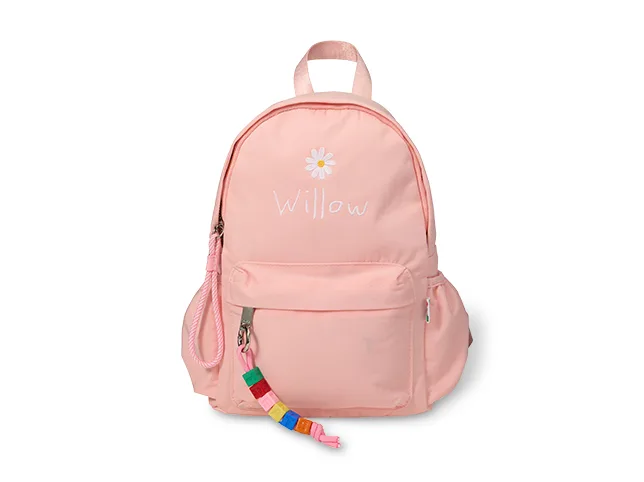
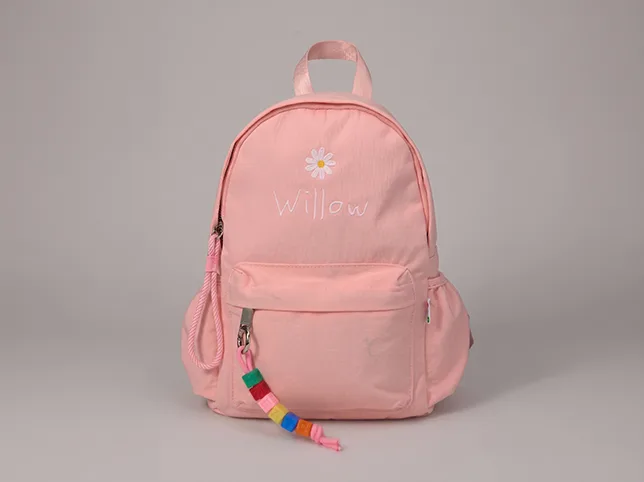
The main image is the one with hard rules. It must be on a pure white background: RGB 255, 255, 255, not an off-white that looks white to you. A background at 253 is close enough for a human eye and not close enough for an automated check, particularly in competitive categories.
The product must fill at least 85% of the frame, and the main image must carry no text, logos, watermarks, borders or inset images. It must be the actual product, not a rendering or a placeholder.
Before
After
Pure white, not nearly white. Drag to compare.
The 1000 px figure is not a quality guideline, it is a feature switch: below it, zoom does not turn on. Zoom is the thing customers use before spending money, so an image that technically passes at 900 px is a listing quietly selling with one hand behind its back. More on the category rules in Amazon product photo editing.
Etsy: the opposite instinct
Etsy asks for 2000 px on the shortest side: note shortest, which is a stricter way of stating it than most platforms use, and gives you 20 photo slots plus a video, far more than anywhere else.
The important difference is not technical. Etsy’s ranking responds to whether shoppers click your first photo, so a styled, characterful lead image can outperform a clinical white cut-out: the reverse of what Amazon rewards. And the thumbnail is cropped differently on desktop and mobile, so the piece has to survive both crops.


Before
After
Recentred so it survives both thumbnail crops. Drag to compare.
Selling in both places means accepting that the same lead image cannot be optimal on both. Use the white cut-out as Amazon’s main and as one of Etsy’s twenty, and give Etsy a different first photo. We set the full slot-by-slot plan out in Etsy photo editing.
Shopify: permissive, which is the problem
Shopify accepts almost anything: up to 5000 × 5000 px or 25 megapixels, under 20 MB, in nine formats. It recommends 2048 × 2048 for square product images.
Because nothing is enforced, the discipline has to come from you. A marketplace rejects an inconsistent image; your own storefront simply displays it, and the collection page is where inconsistency is most visible: the grid shows twenty products at once and any one that is framed differently is the one the eye lands on.


Before
After
One standard, applied across a storefront. Drag to compare.
Set your own house rules, one background, one product-to-frame proportion, one shadow style, and enforce them yourself. There is more on holding a grid together in Shopify product photo editing.
eBay: watch the graphics rule
eBay asks for 500 × 500 px minimum and recommends about 1600 × 1600, with up to 24 images and a 12 MB ceiling. It prefers 1:1 or 16:9.
Two rules catch sellers. eBay says not to add graphics to images: badges, logos, copyright notices or watermarks, and warns this can hurt search placement. And you may not use a catalogue or stock photo when listing an item as used, which matters to every reseller: a secondhand piece needs its own photographs, including honest ones of the wear.
Google Merchant Center: the feed rules
Minimum 500 × 500 px, recommended 1500 × 1500 or above, maximum 16 MB and 64 megapixels.
The prohibitions are what disapprove listings: no promotional overlays or price text, no watermarks, brand names or logos unless inherent to the product, no borders, no placeholder images, no barcodes, no multiple colour variants shown together, and no unrelated products in the frame.
The variant rule surprises people. A product shown in three colourways in one photograph is a useful image and an invalid one, because the listing is for a single variant. The fix is one image per variant, which a colour change produces from a single photograph without a second shoot.
How do you produce one set that works everywhere?
Not by editing five times. Edit once, properly, then export.
- Master at 2500 px square or larger, sRGB, product filling about 85% of the frame, on pure white. That clears every minimum above and Amazon’s hardest rule at the same time.
- Keep the cut-out on its own layer. Every later format comes from rebuilding the canvas, not from cropping a flat image.
- Export down per platform rather than up. Scaling down is lossless in practice; scaling up invents detail, and it shows on fabric and printed logos.
- Build the other ratios from the layered file: square for the grid, vertical for social, wide for a banner.


Before
After
Square and vertical from one edit, not two. Drag to compare.
Cropping a finished square into a vertical usually cuts the product in half, which is why this step is worth insisting on. Cropping and resizing to a platform’s exact spec is the least interesting part of the job and the one that decides whether the set holds together.
The four mistakes that account for most rejections
- Nearly-white backgrounds. Passing to your eye, failing to a scanner. If the background was photographed rather than replaced, assume it is not 255.
- Watermarks. Prohibited by Google, discouraged by eBay, banned from Amazon’s main image. Protect your images another way.
- Upscaling to meet a minimum. It meets the number and fails the eye, worst on textiles and text.
- Using the supplier’s images untouched. They frequently carry a watermark, a variant grid or a border, and you need the rights to them regardless of whether they pass.
Send us the images that are being rejected
If listings are being suppressed or disapproved and you are not sure which of your photographs is at fault, send three. We will edit them to a compliant standard free and tell you what was wrong: background value, watermark, framing, resolution or colour.
Start a free trial: 3 images edited free. No credit card and no account required. Per-image rates are on the price list, and for a whole catalogue there is eCommerce photo editing.
Last verified against each platform’s own documentation on 15 September 2026. Platform rules change; check your own category’s guide before a large batch.
Frequently asked questions
What is the best product image size for all marketplaces?
A master file at 2000 x 2000 pixels or larger in sRGB clears every major platform’s minimum at once, and platform versions export down from it. Working at 2500 px square gives room to crop into other ratios without upscaling later.
What are Amazon’s main image requirements?
A pure white background at RGB 255, 255, 255, the product filling at least 85% of the frame, a minimum of 1000 px on the longest side to enable zoom with 1600 px recommended, files under 10 MB in JPG, TIFF, GIF or PNG, and no text, logos, watermarks, borders or inset images. Requirements vary by category, so check your own category style guide.
What size images does Etsy require?
At least 2000 px on the shortest side – a stricter way of stating it than most platforms, which quote the longest side. Etsy allows 20 photos plus one video, and crops thumbnails differently on desktop and mobile, so the product has to survive both crops.
Can I use the same lead image on Amazon and Etsy?
You can, but it will not be optimal on both. Amazon’s main image must be a pure white cut-out; Etsy’s ranking responds to whether shoppers click the first photo, so a styled image often performs better there. Use the white cut-out as Amazon’s main and as one of Etsy’s twenty, and give Etsy a different first photo.
Are watermarks allowed on product images?
Not where it matters. Google Merchant Center prohibits watermarks, brand names and logos unless inherent to the product; eBay says adding badges, logos, copyright notices or watermarks can hurt search placement; Amazon bans them from the main image. Protect your photographs by another route.
Why is my Google Shopping listing disapproved for the image?
Most commonly a promotional overlay or price text, a watermark or logo, a border, a barcode, several colour variants shown in one photograph, or an unrelated product in the frame. The colour variant rule catches sellers often, because a three-colourway photograph is a useful image but an invalid product image.
Can I upscale an image to meet a platform minimum?
You can, and it is usually a mistake. Upscaling invents detail rather than recovering it, and the invention is visible on fabric texture, fine metal and printed logos – exactly the areas customers zoom into. Reshooting or sourcing a larger original beats upscaling every time.